Why Phishing Still Works
It happens to all of us. Enter your password. Open your authenticator app. Wait for a push notification. Text message. Email.
We know that these systems are in place to protect us, but they’re tedious and annoying. After a while, we start to make the process easier for ourselves and respond on reflex.
This isn’t a knock, it’s quite literally how people are. Optimizing frequent tasks is considered a good thing in almost any other situation. It can become worse in a professional context as well, where security controls may be even tighter and the pressure to work quickly is higher.
According to the 2025 Verizon Data Breach Investigations Report, human-related elements, including social engineering and misuse, continue to dominate:
- Nearly 60% of breaches involve a human element
- Social engineering accounts for 17% of breaches
- Phishing is the initial attack vector in 14–16% of breaches
And most of that isn’t because systems failed. It’s because people behaved exactly the way those systems trained them to. Let’s look at some examples.
The Uber breach (2022)
There wasn’t some clever vulnerability here. They bought stolen credentials and logged in. s The account was protected by multi-factor authentication (MFA), which should have stopped them. Instead, they contacted the employee on WhatsApp, pretending to be IT support and flooded the employee with MFA prompts.
Eventually, the employee approved one, just to make the notifications stop.
Nothing here required anything particularly technical. They just had to be persistent, and annoying, enough to turn a security control into something the employee wanted to get rid of.
The Salesforce vishing campaign (2025)
This was a large-scale campaign against companies that used Salesforce. Hackers used voice phishing (“vishing”) to call employees and impersonate internal IT support. Once they gained access, they used Salesforce’s Data Loader (a legitimate tool for adding and extracting data in Salesforce) to extract data.
This wasn’t about tricking someone with a fake login page or a suspicious email. It was about sounding legitimate long enough to be treated like someone with authority.
Why phishing works
If you zoom out, most phishing attacks succeed for the same reasons and they have less to do with technical weakness than how people actually operate day to day.
Trust is the default. People are trained to trust internal systems and coworkers. If someone messages you and says they’re from IT, most people don’t stop and question it unless something feels obviously off.
Urgency crowds out thinking. You get a warning or something says your account might be locked and suddenly it feels like you need to deal with it right now. In those moments, slowing down to verify isn’t what the situation rewards.
Fatigue turns decisions into reflexes. In the moment security becomes background noise. Repeated prompts, alerts, and notifications make it easier to just approve and move on than to stop and think. MFA fatigue attacks lean into this by making approval the fastest way to make the interruption stop.
Systems quietly train bad habits. This doesn’t happen by accident. Over time, security systems don’t just protect users, they condition them.
- Constant prompts teach users to click without thinking
- Frequent warnings train users to ignore alerts
- Familiar-looking interfaces reinforce trust, even when they shouldn’t
We don’t just ignore security warnings. We’re trained to.
In a phishing test I ran a few years back, I didn’t need to design anything convincing from scratch. I reused a legitimate Microsoft email that was sent to me earlier that week. Same structure, same links, and only changed the action I wanted the user to take.
The result didn’t feel like a scam. It felt familiar.
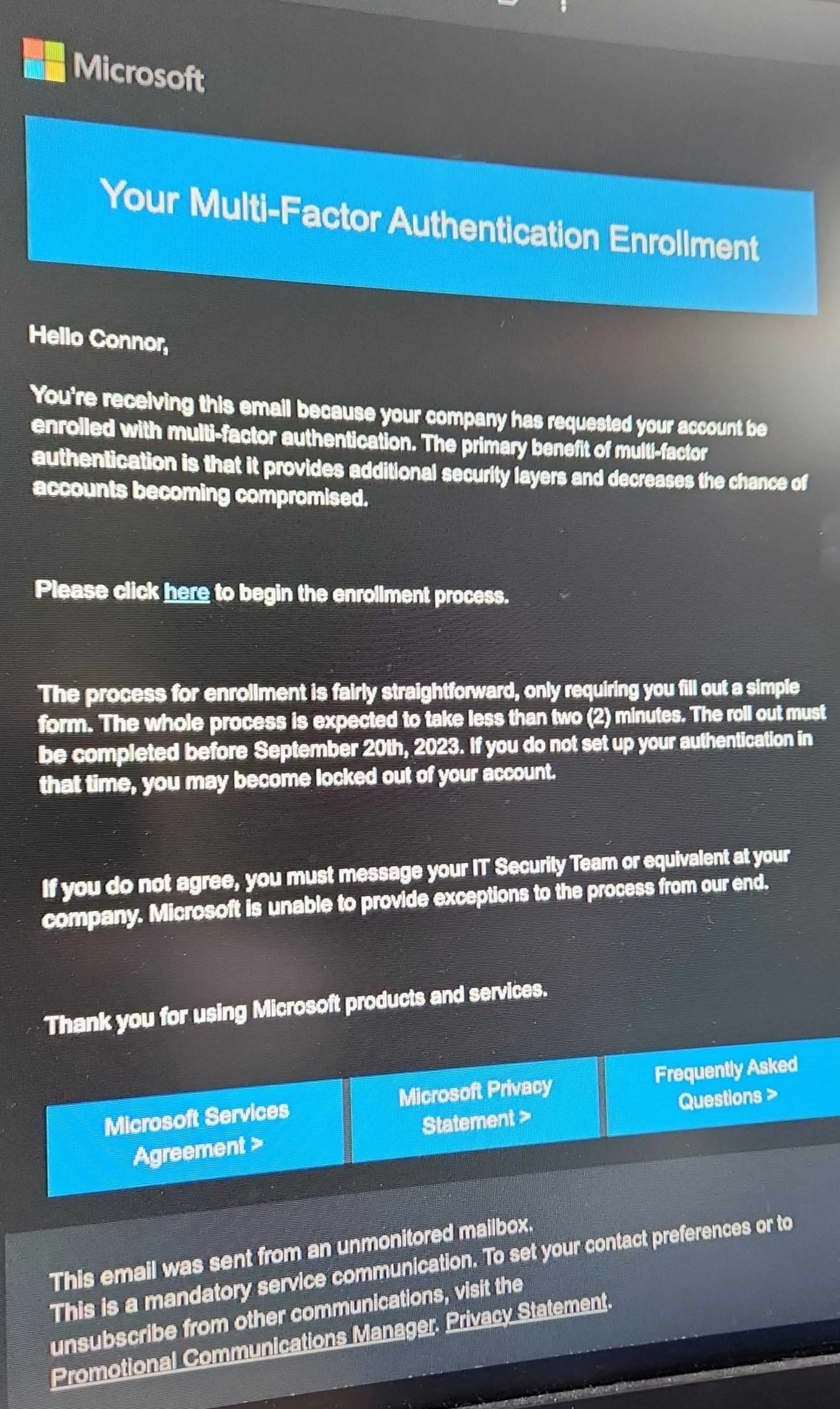 Even the IT Director was initially confused when he saw the test email, since he hadn’t called for the company to roll out MFA.
Why phishing will always work
Even if you improve training or tooling, the underlying dynamic doesn’t really change.
People use shortcuts. We rely on patterns and familiarity, not deep analysis, especially in routine tasks.
Work rewards speed. Employees are incentivized to get things done quickly. Slowing down to verify every interaction just isn’t practical most of the time.
Security adds friction. Over time, people figure out ways to get around that friction however they can.
Attackers don’t need perfection. Defenders need consistent, correct behavior from everyone. Attackers only need one moment where it works.
Final thought
The problem isn’t that people don’t care about security. It’s that we’ve built systems that expect them to behave in ways people just don’t, especially when they’re busy, distracted, or just trying to get through their day.
If we want phishing to be less effective, the answer isn’t just more training. It’s designing systems that actually work with how people behave, not against it.
~ Connor
References
- Verizon Data Breach Investigations Report (2025)
- Uber Security Update (2022)
- IC3 Advisory: Salesforce-related vishing campaign (2025)
- Google Threat Intelligence: Voice phishing and data extortion
- Proofpoint: Preventing MFA Fatigue Attacks
- Microsoft Digital Defense Report (2023)
- NIST: Security Fatigue research
- “Why People Still Fall for Phishing Emails” (arXiv, 2024)